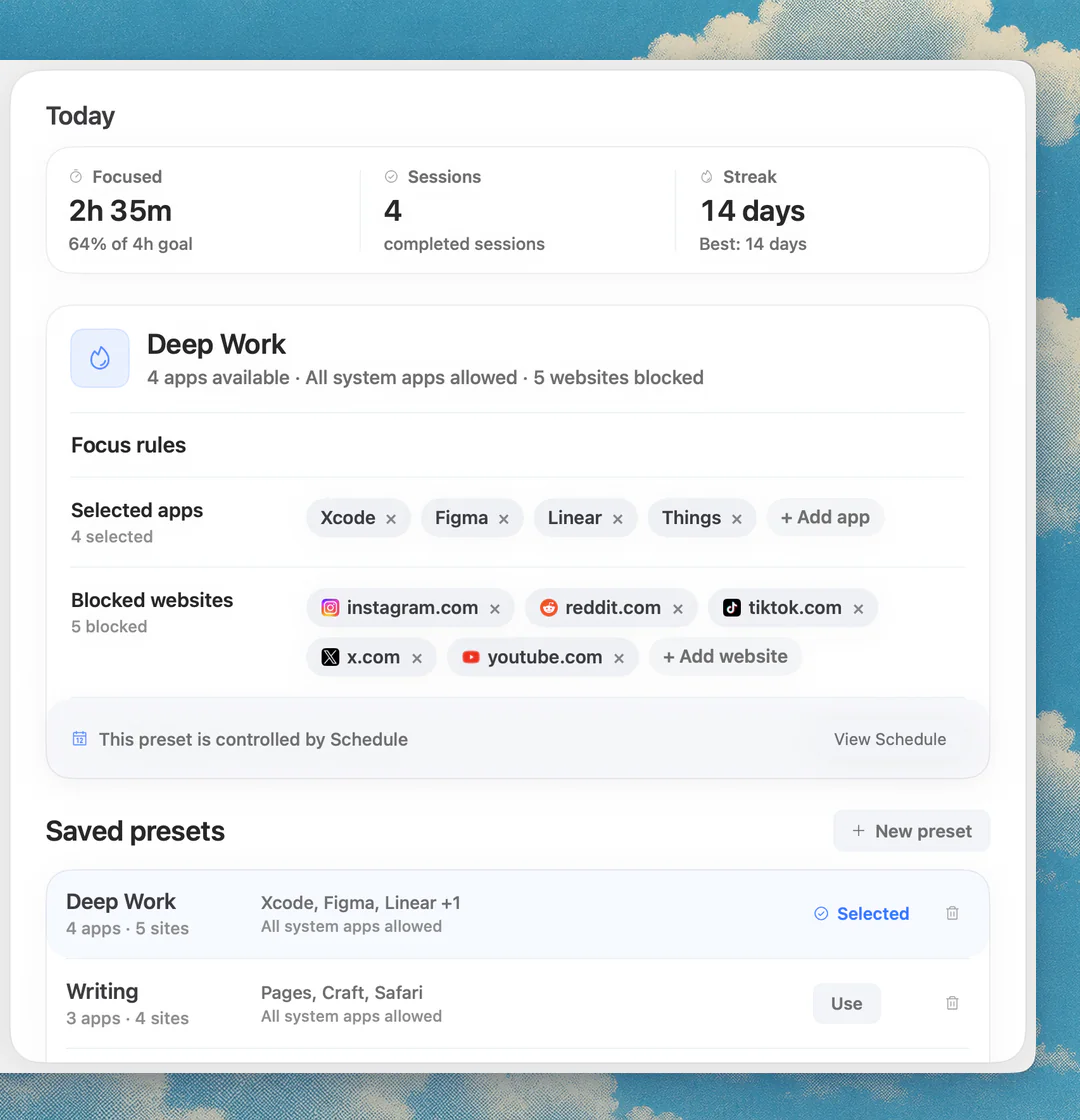
Focus app for writing on Mac: tools and presets that keep drafts moving
Focus app for writing on Mac: block feeds, mail and chat while you draft, with separate presets for research, editing and publishing. Picks and FAQ.

Quick answer
The best focus app for writing on a Mac is Nudge paired with a clean writing app such as iA Writer or Ulysses: save one preset per stage (drafting, research, editing, publishing) that blocks feeds, mail and chat, and start it from the menu bar. Nudge costs $9.99 once, after a 7-day free trial. Use Freedom or SelfControl if a few sites are the only problem, and Session for short timed writing starts.
How do these apps compare?
Protect writing sessions without blocking the research and editing tools writers need.
| App | Best for | Price | Website |
|---|---|---|---|
 NudgeTop pick NudgeTop pick | Writing session blocking | $9.99 once | Get Nudge |
 iA Writer iA Writer | Minimal drafting | See pricing | Visit |
 Ulysses Ulysses | Organized writing library | See pricing | Visit |
 Scrivener Scrivener | Long-form projects | See pricing | Visit |
 Obsidian Obsidian | Research notes | See pricing | Visit |
  Freedom or SelfControl Freedom or SelfControl | Strict site blocking | $8.99/mo or $99.50 lifetime (Oct deal) / Free | Visit |
 Session Session | Timed writing starts | Free, Pro $39.99/yr | Visit |
Which tool should you pick?
Drafting
Nudge + iA Writer or Ulysses
Keep the writing surface open and block feeds/inboxes.
Long-form projects
Scrivener
Useful for chapters, notes, research, and structure.
Research-heavy writing
Obsidian or Notion
Good for source notes and linked material.
Short timed starts
Session
Pomodoro-style writing blocks with review.
The apps in detail
- $9.99 once
1. Focus protection
Nudge
Best for: Writing session blocking
- Choose it if
- You want separate presets for drafting, research, editing, and publishing.
- Skip it if
- You only need a text editor.
2. Writing
iA Writer
Best for: Minimal drafting
- Choose it if
- You want a clean text-first writing surface.
- Skip it if
- You need complex book structure.
3. Writing
Ulysses
Best for: Organized writing library
- Choose it if
- You want a polished Mac writing environment.
- Skip it if
- You want plain file-based notes only.
4. Writing
Scrivener
Best for: Long-form projects
- Choose it if
- You manage chapters, research, and drafts in one project.
- Skip it if
- You write mostly short pieces.
5. Notes
Obsidian
Best for: Research notes
- Choose it if
- You want markdown notes and linked sources.
- Skip it if
- You need a pure writing app.
- $8.99/mo or $99.50 lifetime (Oct deal) / Free
6. Website blocking
Freedom or SelfControl
Best for: Strict site blocking
- Choose it if
- A few sites repeatedly interrupt drafting.
- Skip it if
- You need task-specific app blocking too.
- Free, Pro $39.99/yr
7. Timer
Session
Best for: Timed writing starts
- Choose it if
- You write better in short, measurable blocks.
- Skip it if
- You want app and site blocking for free. In Session it is a Pro feature.
Writing is not one mode
Drafting, research, editing, and publishing need different tools. Drafting may need almost no browser. Research needs sources. Editing needs grammar, style, and references. Publishing may need CMS, analytics, and images.
One blocklist for all writing work will either be too strict or too weak.
The drafting preset
Block mail, chat, feeds, video, news, and analytics. The writing app, notes, outline, and one dictionary stay open. The goal is to keep the cursor moving. Messages and Mail are apps, not websites, so use a blocker that handles apps too: see how to block apps on a Mac. One rhythm to try is a 52-minute drafting block and a 17-minute break; the 52/17 rule explains it, and the free online Pomodoro timer runs shorter cycles.
The research preset
Keep search, source domains, notes, PDFs, and reference managers open. Block entertainment and infinite feeds. Research should be broad enough to answer the question, not broad enough to avoid the draft.
Separate drafting, research, editing, and publishing
Writing fails when every stage has the same browser access. Drafting needs the least. Research needs selected sources. Editing needs references and maybe grammar tools. Publishing needs CMS, images, links, and sometimes analytics. Treat each as a different mode.
This gives you stricter rules where they help and looser rules where the work actually requires them.
Research without avoidance
Research should have a defined output. Before opening the browser, decide what the session must produce: a source list, a quote note, a comparison table, a statistic check, or a decision. Use a shorter timer for research than for drafting if you tend to wander.
When the output is collected, switch back to the drafting preset. Do not let research remain the default state.
Editing and publishing presets
Editing needs grammar tools, style references, notes, and the draft. Publishing needs the CMS, image tools, link checks, and analytics. Both should still block feeds, shopping, news, and personal inboxes unless they are explicitly part of the task.
The key is to avoid one giant writing preset. Good writing workflows move through stages, and the block list should move with them.
A 90-minute writing block
Start with ten minutes of outline cleanup, then run a 45-minute drafting preset with the browser mostly closed. Take a real break. Use a 20-minute research preset only for missing facts. End with ten minutes of notes for the next session. This produces more useful output than leaving the browser open for the whole block.
Nudge is useful because each stage can have its own blocked apps and websites.
Source handling for SEO writing
For SEO writing, research should produce reusable notes, not copied paragraphs. Capture competitor angles, tool names, pricing checks, feature claims, and missing questions. Then close the source and write the section in your own structure.
This creates better pages than paraphrasing a competitor. It also reduces duplicate-content risk and makes the article more useful for readers.
Outline-first writing
Before drafting, create headings that answer real search intent: best picks, comparison table, use cases, setup steps, mistakes, FAQ, and related guides. Then fill each section with concrete decisions rather than generic productivity advice.
A focus preset helps because each stage has a clear boundary. An outline preset can leave search open. A drafting preset can block it. An editing preset can reopen references.
Measure draft movement
A writing session should be judged by movement: rough words added, outline clarified, sources converted into notes, edits completed, or publication steps finished. Website blocking is useful only if it moves one of those outcomes.
If a preset feels strict but the draft is not improving, the problem may be the task definition rather than the blocker. Tighten the next action before tightening the rule set.
For SEO writing, this matters even more. A session that produces a useful comparison table, better FAQ answers, or a clearer recommendation is more valuable than a session that simply blocks many websites.
A better article comes from sharper decisions, not from having every possible source open at once.
Keep the source list tight, then spend the saved attention on the actual draft.
FAQ
What is the best focus app for writers on Mac?
Nudge is useful for writers who need different presets for drafting, research, editing, and publishing. Session is useful for timed writing starts. Freedom or SelfControl are useful when a few sites repeatedly interrupt drafts.
Should writers block the internet?
Only during drafting if the task does not need research. Most writers need the web at some stage, so task-specific presets are safer than a permanent internet block.
What should a drafting preset block?
A drafting preset should block mail, chat, feeds, video, analytics, and anything that turns writing into checking. The writing app, notes, outline, and a dictionary stay open.
How do I stop research from becoming procrastination?
Give research a narrow output and a shorter time box. Collect the needed facts, then switch back to the drafting preset before the research session becomes general browsing.
Can I block Mail and Messages while I write on a Mac?
Yes. Nudge blocks the Mac apps you pick, such as Mail and Messages, along with the websites in your preset, for the length of a writing session. Websites are blocked in Safari and Chrome, and everything is reachable again when the session ends. It costs $9.99 once after a 7-day free trial.
Nudge for Mac
Turn the guide into a focus session
Pick the apps and websites that pull you away and start the session from the menu bar. They stay blocked until it ends. $9.99 once after 7 days free, no card to start.
Download for macOS