The 52/17 rule: what it is and how to try it on a Mac
The 52/17 rule means 52 minutes of focus and a 17-minute break. Where it came from, how it compares with Pomodoro, and how to run it on a Mac with a timer.
Quick answer
The 52/17 rule is a work pattern of 52 minutes of focus followed by a 17-minute break. It comes from a 2014 DeskTime analysis of its most productive users, so it is an observation, not a scientific law. To try it on a Mac, set the free Pomodoro timer at nudgefocus.app/pomodoro-timer to Custom with 52 minutes of focus and a 17-minute break, and use Nudge to block distracting apps and websites for the 52 minutes.
How do these apps compare?
Understand what the 52/17 rule is, whether it is a real finding, and set up a 52 minute timer on a Mac.
| App | Best for | Price | Website |
|---|---|---|---|
 NudgeTop pick NudgeTop pick | Blocking distractions during the 52 minutes | $9.99 once | Get Nudge |
 Pomofocus Pomofocus | A free browser timer with custom lengths | See pricing | Visit |
 Be Focused Pro Be Focused Pro | A native Mac timer | $19.99 once | Visit |
 Session Session | A Mac and iPhone focus timer | Free, Pro $39.99/yr | Visit |
 Flow Flow | A Mac, iPhone and iPad timer with blockers | Free, Pro from $1.49/mo | Visit |
Which tool should you pick?
Run the rule on a Mac
Nudge plus the free timer
Timer at 52/17 for pacing, Nudge to block distractions during the 52 minutes.
Free browser timer
Free Pomodoro timer
Custom preset takes any focus length from 1 to 180 minutes and breaks from 1 to 60.
Another free option
Pomofocus
Custom focus and break times in the free basic features.
Native Mac timer, one-time price
Be Focused Pro
Sets work and break lengths. $19.99 on the Mac App Store.
Mac and iPhone timer
Session
Free tier. Custom lengths, which 52/17 needs, are in Pro at $39.99 a year.
The apps in detail
- $9.99 once
1. App and website blocking
Nudge
Best for: Blocking distractions during the 52 minutes
- Choose it if
- You want the apps and websites you pick blocked while a session runs, for $9.99 once. Pair it with a 52/17 timer.
- Skip it if
- You need to block apps on your phone too: Nudge is a Mac app, so look at Freedom, Opal or Session.
2. Timer
Pomofocus
Best for: A free browser timer with custom lengths
- Choose it if
- You want to set your own focus and break times in the browser. Premium adds projects, yearly reports and integrations, priced at checkout.
- Skip it if
- You want the timer to block sites or apps. It does not.
- $19.99 once
3. Timer
Be Focused Pro
Best for: A native Mac timer
- Choose it if
- You want a one-time purchase at $19.99 with work, short break and long break lengths you can set.
- Skip it if
- You want a free tool.
- Free, Pro $39.99/yr
4. Timer
Session
Best for: A Mac and iPhone focus timer
- Choose it if
- You want a timer on Mac and iPhone. Custom session and break lengths are in Pro, at $4.99 a month or $39.99 a year.
- Skip it if
- You want custom lengths for free. They are a Pro feature.
- Free, Pro from $1.49/mo
5. Timer and blocking
Flow
Best for: A Mac, iPhone and iPad timer with blockers
- Choose it if
- You want a free basic tier. Fully customizable durations are in Pro, from $1.49 a month billed yearly.
- Skip it if
- You want everything in the free plan.
What is the 52/17 rule?
The 52/17 rule is a way of pacing work: focus for 52 minutes, then take a 17-minute break, and repeat. Some people use it as an alternative to the 25-minute Pomodoro when 25 minutes feels too short to get into a task.
It is a pattern, not a prescription. You can use it as a starting point and change the numbers to fit your work.
Where does the 52/17 rule come from?
The numbers come from a 2014 analysis by DeskTime, a time-tracking app. DeskTime looked at its most productive users, the top 10% by its own productivity scoring, and reported that they averaged about 52 minutes of tracked work followed by about 17 minutes away from tracked activity.
This is an observation from one company's data. It shows what highly rated users tended to do. It does not show that a 17-minute break causes better results, and the numbers are not a biological threshold. DeskTime has also reported a later rerun on 2021 data with different figures, 112 minutes of work and a 26-minute break, which is a sign that the exact numbers should not be treated as fixed. DeskTime's own blog describes both the 2014 analysis and the 2021 rerun.
Is the 52/17 rule from Cambridge?
There is no known link. The rule traces back to the DeskTime analysis, and coverage of it does not mention the University of Cambridge. Treat a claim that Cambridge researchers discovered the rule as unsupported unless it links to a real study.
One experiment that often gets cited alongside the rule is a 2011 paper in the journal Cognition by Alejandro Lleras and Atsunori Ariga on brief mental breaks. That is a separate study, not the source of 52/17.
How does 52/17 compare with Pomodoro?
All of these are ways to chop work into blocks with rests. The right one depends on how long it takes you to get into a task and how much interruption it can survive.
- The free Pomodoro timer has presets for Pomodoro 25/5, Deep work 50/10 and Long focus 90/20, and a Custom preset for anything else, including 52/17.
- For more on the classic method, see the best Pomodoro apps for Mac.
| Method | Focus | Break | Suits |
|---|---|---|---|
| Pomodoro | 25 min | 5 min (longer break after 4) | Starting tasks, small items, easily distracted days |
| 50/10 | 50 min | 10 min | Study and writing blocks |
| 52/17 | 52 min | 17 min | Tasks that need warm-up and a real break |
| 90/20 | 90 min | 20 min | Deep, single-task work |
Who is the 52/17 rule for?
It suits work where the first 10 to 15 minutes are warm-up: writing, coding, design, studying. A 25-minute block can end just as you get going. It also suits people who want a longer, real break away from the screen.
It suits less well when interruptions are constant or tasks are short. In those cases a 25/5 rhythm may fit better. Try it for a few days, and keep it only if it matches how you work.
How do you set a 52/17 timer in the free web timer?
The free timer at nudgefocus.app/pomodoro-timer runs in any browser with no sign-up. The Custom preset accepts focus lengths from 1 to 180 minutes and breaks from 1 to 60.
Open the Pomodoro timer page in your browser.
Click the Settings button (the sliders icon) near the bottom of the timer.
Under Preset, choose Custom.
Set Focus to 52 min and Short break to 17 min. Adjust Long break and Long break after if you want a longer rest after several rounds.
Turn on Auto-start next phase if you want breaks and rounds to begin on their own.
Close the panel and press Start (or Space).
How do you protect the 52 minutes on a Mac?
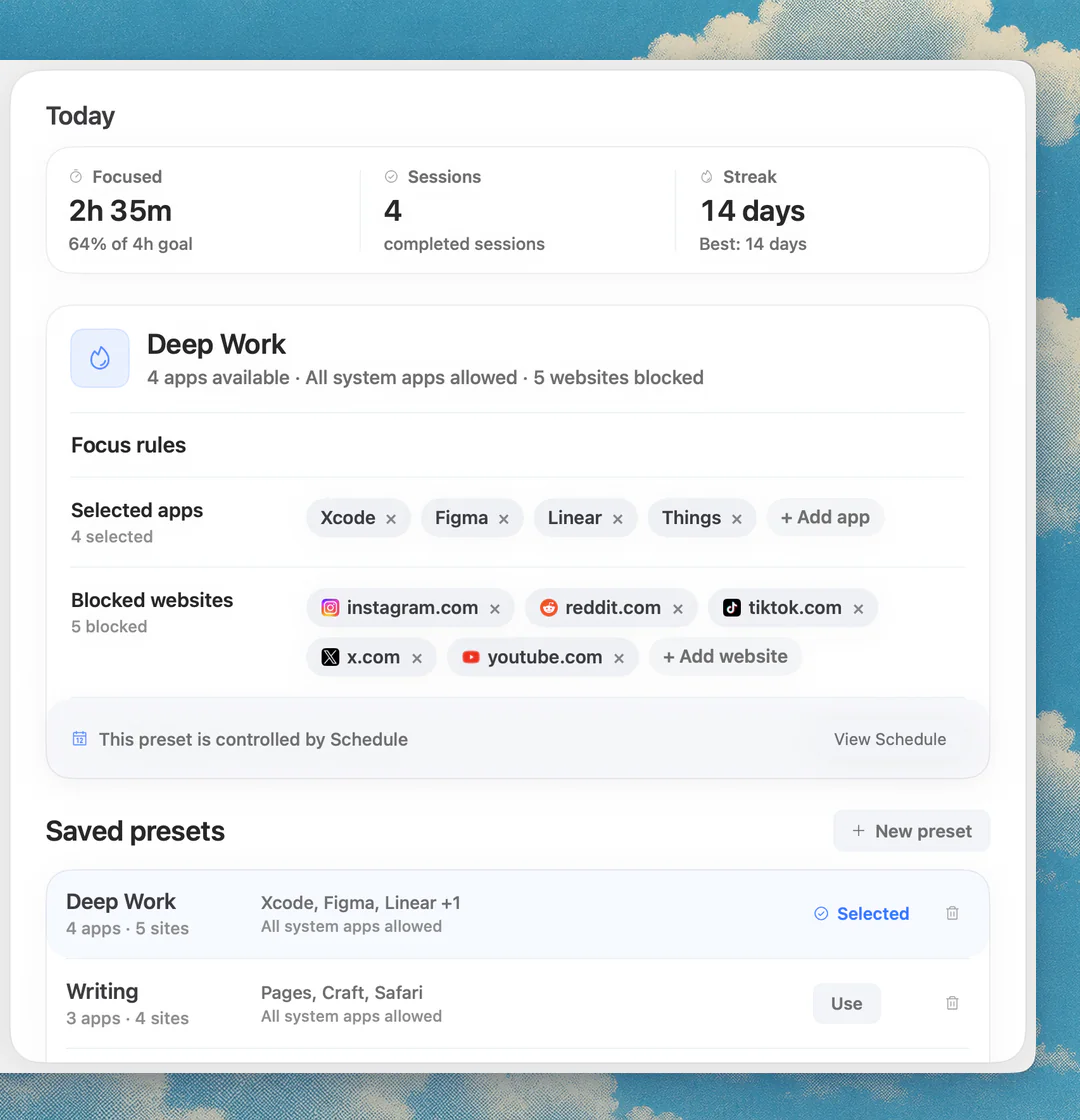
A timer paces the work, but it does not stop you opening a feed. Nudge blocks the apps and websites you pick while a focus session runs. Websites are blocked in Safari and Chrome, and everything is reachable again when the session ends.
Create a preset, such as Deep Work, with your distracting apps and sites. Start it from the menu bar when the 52 minutes begin, and use the 17-minute break to step away from the screen. Nudge costs $9.99 once for Lifetime Access, with a 7-day free trial that needs no email, password or card. For a step-by-step method, see how to block apps on a Mac and the guide to Pomodoro with website blocking.
What are the other timer options on Mac?
Prices below were checked on each vendor's site on 10 October 2026.
- Pomofocus: browser timer with custom focus and break times. Premium adds projects, yearly reports and integrations, priced at checkout.
- Be Focused Pro: Mac App Store, $19.99, Mac only, with settable work and break lengths.
- Session: Mac and iPhone, free tier. Custom session and break lengths are in Pro, $4.99 a month or $39.99 a year.
- Flow: Mac, iPhone, iPad and Watch, free basics, Pro from $1.49 a month billed yearly, with fully customizable durations.
FAQ
What is the 52/17 rule?
It is a work pattern of 52 minutes of focus followed by a 17-minute break. It comes from a 2014 DeskTime analysis of its most productive users and is an observation, not a proven rule.
Is the 52/17 rule backed by science?
Not as a scientific law. It was observed in one company's time-tracking data, which cannot show that the break length causes better results. Treat the numbers as a starting point.
Is the 52 17 rule from Cambridge?
There is no credible source linking it to the University of Cambridge. The rule traces back to DeskTime's 2014 analysis of its own users.
52/17 rule vs Pomodoro: which is better?
Neither is better for everyone. Pomodoro uses 25 minutes of focus and 5 of rest and suits starting tasks. 52/17 gives longer focus and a longer break and suits work with a warm-up. Try both for a few days.
What is a good 52 17 rule timer?
The free Pomodoro timer at nudgefocus.app/pomodoro-timer works: choose Custom, set Focus to 52 and Short break to 17. Pomofocus and Be Focused Pro also let you set your own lengths, and so do Session and Flow in their Pro plans.
How do I stop distractions during the 52 minutes?
Use a blocker. Nudge blocks the apps and websites you choose while a session runs on a Mac, and websites are blocked in Safari and Chrome.
Nudge for Mac
Turn the guide into a focus session
Pick the apps and websites that pull you away and start the session from the menu bar. They stay blocked until it ends. $9.99 once after 7 days free, no card to start.
Download for macOS