Best focus apps for ADHD on Mac (2026)
ADHD apps for Mac, sorted by the problem they solve: starting tasks, losing time, feeds, tab overload and forgetting. Platforms and prices checked in 2026.

Quick answer
The best ADHD apps for Mac are a few practical tools that remove friction: Nudge to block the apps and websites that pull you away during a session, a visible timer such as the free Pomodoro timer for time-blindness, Focusmate for body doubling, Things 3 or Todoist to capture tasks, and Structured or Tiimo to plan the day visually. You usually need only one or two.
How do these apps compare?
Pick Mac tools that reduce friction in everyday work, by the specific problem: starting, tracking time, distractions, tabs and remembering.
| App | Best for | Price | Website |
|---|---|---|---|
 NudgeTop pick NudgeTop pick | Blocking distracting apps and websites during a session | $9.99 once | Get Nudge |
 Focusmate Focusmate | Body doubling by video | Free, Plus from $8/mo | Visit |
 Structured Structured | A visual daily timeline | See pricing | Visit |
 Tiimo Tiimo | Visual planning with a built-in timer | See pricing | Visit |
 Things 3 Things 3 | Fast task capture on a Mac | See pricing | Visit |
 Todoist Todoist | Task capture across devices | See pricing | Visit |
 Endel Endel | Background focus sounds | See pricing | Visit |
 Session Session | A focus timer in the menu bar | Free, Pro $39.99/yr | Visit |
Which tool should you pick?
Blocking distractions on the Mac
Nudge
Blocks the apps and websites you choose while a session runs. $9.99 once.
Seeing time pass
Free Pomodoro timer
A large visible countdown in any browser, no sign-up.
Starting with another person
Focusmate
Scheduled video sessions where you work alongside a partner. Free for 3 sessions a week.
Capturing tasks fast
Things 3
A native Mac task manager. Todoist is the cross-platform option.
Planning the day visually
Structured
A timeline planner with a web app for the computer.
The apps in detail
- $9.99 once
1. App and website blocking
Nudge
Best for: Blocking distracting apps and websites during a session
- Choose it if
- You want the apps and sites that pull you off task closed while you work, started from the menu bar, for $9.99 once.
- Skip it if
- You need to block apps on your phone too: Nudge is a Mac app, so look at Freedom, Opal or Session.
- Free, Plus from $8/mo
2. Accountability
Focusmate
Best for: Body doubling by video
- Choose it if
- You start more easily when another person is working next to you. It runs in the browser.
- Skip it if
- You do not want to be on camera.
3. Planning
Structured
Best for: A visual daily timeline
- Choose it if
- You want to see the day as blocks of time. Structured lists iPhone, Apple Watch and a web app.
- Skip it if
- You prefer a plain task list to a timeline.
4. Planning
Tiimo
Best for: Visual planning with a built-in timer
- Choose it if
- You want visual planning and a focus timer. Tiimo lists iPhone, iPad, Apple Watch, Android, Mac and the web.
- Skip it if
- You want a free plan on the Mac. Tiimo's free version runs only in its iOS and Android apps.
5. Task capture
Things 3
Best for: Fast task capture on a Mac
- Choose it if
- You want a calm, native Mac and iPhone task manager.
- Skip it if
- You use Windows or Android as well.
6. Task capture
Todoist
Best for: Task capture across devices
- Choose it if
- You want a free tier and apps for Mac, Windows and Linux.
- Skip it if
- You want a one-time price.
7. Sound
Endel
Best for: Background focus sounds
- Choose it if
- You want a Mac app for generated background sound. It is a paid subscription.
- Skip it if
- You find sound distracting.
- Free, Pro $39.99/yr
8. Timer
Session
Best for: A focus timer in the menu bar
- Choose it if
- You want a Mac and iPhone timer with a free tier and a Pro plan.
- Skip it if
- You only need a free browser timer.
What should you look for in an ADHD app for Mac?
Look for tools that reduce friction, not tools that add a new system to maintain. A good fit is quick to open, easy to start, and forgiving when you skip a day. Most people do better with one or two simple tools than with a stack of apps.
This guide is organized by the problem you are trying to solve, and it describes work habits and tools only. Apps are not a substitute for professional care. Platforms and prices below were checked on each vendor's own site on 10 October 2026.
What helps when you cannot start a task?
Starting is often the hardest part, so shrink the first step and add something that makes it feel real. Two Mac-friendly options are a short timer and body doubling.
A timer turns an open-ended task into a small bet: work until it rings. The free Pomodoro timer runs in any browser with no sign-up and has Pomodoro 25/5, Deep work 50/10, Long focus 90/20 and Custom lengths. A 10-minute sprint is a fine place to begin.
Focusmate offers body doubling: you are matched with another member, both of you work on your own tasks on video, and sessions are 25, 50 or 75 minutes. It runs in the browser. The free plan covers 3 sessions a week. Focusmate Plus is $8 a month billed yearly or $12 a month billed monthly.
What helps when you lose track of time?
If hours disappear, make time visible. A large countdown, a menu bar timer and a day plan drawn as blocks all do this in different ways.
For the timer, use the free Pomodoro timer in a browser tab, or a menu bar timer. Session is a Mac and iPhone focus timer with a free tier and Pro at $4.99 a month or $39.99 a year. Nudge also runs sessions from the menu bar, so the time left is always in view.
For the day plan, Structured shows tasks on a timeline. Its site lists iPhone, Apple Watch and a web app for your computer, and it says you can start planning for free. Tiimo is a visual planner with a focus timer. Its FAQ lists iPhone, iPad, Apple Watch, Android, Mac and the web. The free version runs in the iOS and Android apps, and Tiimo Pro has a 7-day trial on the yearly plan.
What helps when feeds pull you away?
Willpower is a weak defense against a site designed to be opened without thinking. A blocker removes the choice for the length of a session.
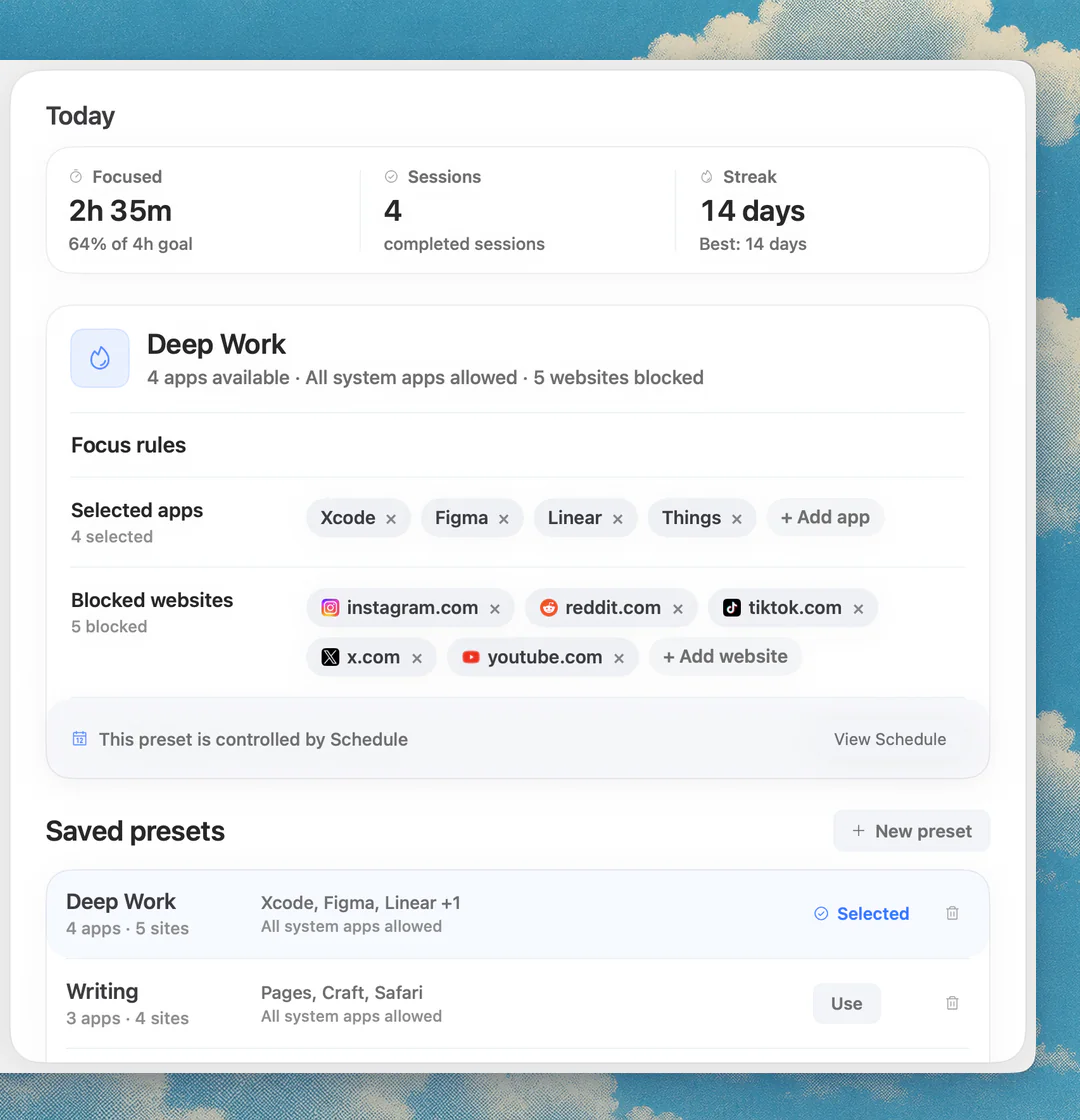
Nudge lets you pick the apps and websites that distract you, then blocks them while a focus session runs. Websites are blocked in Safari and Chrome. When the session ends, everything is reachable again. You can start a preset such as Deep Work from the menu bar, use Quick Focus for a one-off session, or put a preset on a schedule.
Nudge costs $9.99 once for Lifetime Access, with no subscription, and every Mac gets a 7-day free trial with every feature and no email, password or card. For a step-by-step method, see how to block apps on a Mac.
What helps when you have too many tabs and apps open?
Open windows act like a to-do list you cannot see. Reduce them before you start: close what you do not need for this task and keep one window per task.
A session-based blocker helps here too. Put the apps and sites that tempt you in a preset, so they close or stay blocked while you work and are reachable after. Pair that with a written next step on the task, and the tabs have less to compete with.
What helps when you forget things?
Capture first, sort later. The goal is a place to dump a thought in a few seconds so it does not interrupt what you are doing.
Things 3 is a native task manager for Mac, iPhone, iPad and Apple Watch. The Mac version is $49.99 once on the Mac App Store. Todoist has a free Beginner plan and a paid Pro plan, billed monthly or yearly, and it offers a Mac app plus Windows and Linux.
Whichever you choose, use one inbox. Two task apps usually means one of them gets ignored.
Do focus sounds help?
Some people work better with steady background sound, and others find any sound distracting. Try it for a week and keep it only if it makes starting easier.
Endel has a Mac app for macOS 12 or later and is a paid subscription, with prices listed in the App Store. The free Pomodoro timer includes ambient sounds such as rain, river, forest, waterfall and wind. Brain.fm has a desktop app for macOS 12 or later, plus web, iOS and Android, at $14.99 a month or $99.99 a year.
How do you combine these into a simple setup?
Pick one tool for each problem you actually have, and stop there. A starter setup looks like this.
- If you are unsure where to begin, start with the blocker and the timer. They cost little and work on every task.
- For a wider comparison of timers, see the best Pomodoro apps for Mac.
Capture: keep a single inbox in Things 3 or Todoist.
Plan: choose the one task for the next session and write the first step.
Block: start a Nudge session with your distracting apps and websites on the block list.
Time: run a visible timer, for example the free Pomodoro timer at 25/5.
Company: book a Focusmate session on days when starting is hard.
FAQ
What are the best ADHD apps for Mac?
There is no single best app. Match the tool to the problem: Nudge to block distracting apps and websites during a session, a visible timer such as the free Pomodoro timer, Focusmate for body doubling, Things 3 or Todoist for capturing tasks, and Structured or Tiimo for visual planning.
Is there a free focus app for ADHD on Mac?
Yes. The online Pomodoro timer at nudgefocus.app/pomodoro-timer/ is free with no sign-up, Focusmate is free for 3 sessions a week, and Todoist has a free Beginner plan. Nudge has a 7-day free trial and then costs $9.99 once.
Does Tiimo have a Mac app?
Tiimo's FAQ lists Mac among its devices, along with iPhone, iPad, Apple Watch, Android and the web. The free version runs only in the iOS and Android apps, so on a Mac you need Tiimo Pro or its trial.
Can an app block distracting websites and apps on a Mac?
Yes. Nudge blocks the apps and websites you choose while a focus session runs. Websites are blocked in Safari and Chrome, and they are reachable again when the session ends.
What is body doubling and which app offers it?
Body doubling means working alongside another person, in person or on video. Focusmate matches you with a partner for 25, 50 or 75 minute video sessions in the browser.
Does Focusmate work on a Mac?
Yes. Focusmate runs in the browser, so it works on a Mac with no extra app. The free plan covers 3 sessions a week, and Focusmate Plus is $8 a month billed yearly or $12 billed monthly.
Nudge for Mac
Turn the guide into a focus session
Pick the apps and websites that pull you away and start the session from the menu bar. They stay blocked until it ends. $9.99 once after 7 days free, no card to start.
Download for macOS