
Best Pomodoro apps for Mac in 2026: menu-bar timers compared
The best Pomodoro timer for Mac in 2026: 7 menu bar and web timers compared, from free ones (Flow, Session, Nudge web timer) to apps that block websites.
Quick answer
The best free Pomodoro app for Mac is a timer you can start in one click: Nudge's free online Pomodoro timer works in any browser with no sign-up, and Flow and Session have free tiers as native apps. If you want the timer to also block distractions, Nudge is a menu bar Pomodoro timer that blocks the apps and websites you pick for the whole 25 minutes, for $9.99 once with a 7-day free trial. Be Focused Pro ($19.99 once) suits a simple interval timer, Session suits stats, and Focus suits Pomodoro with strict blocking. Prices checked on each vendor's site on 10 October 2026.
How do these apps compare?
Find a Pomodoro timer that matches how much structure and blocking you need.
| App | Best for | Price | Website |
|---|---|---|---|
 NudgeTop pick NudgeTop pick | 25-minute sessions with app and website rules | $9.99 once | Get Nudge |
 Be Focused Pro Be Focused Pro | Simple Pomodoro timing | $19.99 once | Visit |
 Session Session | Pomodoro-style sessions with stats | Free, Pro $39.99/yr | Visit |
 Focus Focus | Pomodoro plus strict blocking | From $29 once | Visit |
 Flow Flow | Free interval timer | Free, Pro from $1.49/mo | Visit |
 Focus To-Do Focus To-Do | Pomodoro plus tasks | See pricing | Visit |
 Pomofocus Pomofocus | Lightweight web timer | See pricing | Visit |
Which tool should you pick?
Best free Pomodoro timer
Free online timer
Nudge's free web timer at /pomodoro-timer/: Pomodoro 25/5, Deep work 50/10, Long focus 90/20, custom lengths, ambient sounds and session stats, no sign-up.
Best simple Mac timer
Be Focused Pro
Classic intervals and breaks, with optional app and website blocking, as a one-time Mac App Store purchase.
Best free timer
Flow
A free interval timer for Mac, iPhone and iPad. Pro starts at $1.49 a month, billed yearly.
Best session stats
Session
Focus sessions and history on Mac and iPhone, with blocking on the Mac in Pro. Pro is $4.99 a month or $39.99 a year.
Best timer plus strict blocking
Focus
Pomodoro with website and app blocking and a Locked Mode, in one-time licenses.
Best environment protection
Nudge
Start a 25-minute session from the menu bar with distracting apps and sites blocked. $9.99 once.
The apps in detail
- $9.99 once
1. Focus protection
Nudge
Best for: 25-minute sessions with app and website rules
- Choose it if
- Your timer fails because distracting apps and sites stay one click away.
- Skip it if
- You only want a countdown with no blocking.
- $19.99 once
2. Timer and blocking
Be Focused Pro
Best for: Simple Pomodoro timing
- Choose it if
- You want classic intervals and breaks, with optional app and website blocking, paid once.
- Skip it if
- You need a block you cannot switch off.
- Free, Pro $39.99/yr
3. Timer and review
Session
Best for: Pomodoro-style sessions with stats
- Choose it if
- You want focus sessions and history on Mac and iPhone, with blocking on the Mac.
- Skip it if
- You want to pay once. Pro is $4.99 a month or $39.99 a year.
- From $29 once
4. Blocking and timer
Focus
Best for: Pomodoro plus strict blocking
- Choose it if
- You want Pomodoro with website and app blocking and a Locked Mode, for a one-time price.
- Skip it if
- You want minimal configuration.
- Free, Pro from $1.49/mo
5. Timer and blocking
Flow
Best for: Free interval timer
- Choose it if
- You want a free timer on Mac, iPhone and iPad.
- Skip it if
- You need strict blocking.
6. Timer and tasks
Focus To-Do
Best for: Pomodoro plus tasks
- Choose it if
- You want task lists tied to focus intervals.
- Skip it if
- You already have a task manager.
7. Timer
Pomofocus
Best for: Lightweight web timer
- Choose it if
- You want a quick browser-based timer.
- Skip it if
- The browser itself is the problem.
Which Pomodoro timer for Mac is best?
For most people, the best Pomodoro app for Mac is a menu bar timer that starts a 25-minute session in one click and does something about the distractions during it. Nudge does this: you start a session from the menu bar, and the apps and websites you chose are blocked until the timer ends. It costs $9.99 once, after a 7-day free trial with no card to start.
If you only want a countdown with rounds and breaks, Be Focused Pro is a one-time $19.99 purchase on the Mac App Store, Flow has a free tier, and Session has a free plan with Pro at $4.99 a month. Focus pairs a Pomodoro timer with strict blocking. The comparison and the detail cards above show each one.
Want a free Pomodoro timer for Mac right now? Nudge's free online Pomodoro timer runs in any browser, with Pomodoro 25/5, Deep work 50/10 and Long focus 90/20 presets, custom lengths, ambient sounds and session stats, and needs no sign-up. It is a separate tool from the Mac app, and it cannot block other apps, so pair it with a blocker when the session keeps leaking. Not sure 25 minutes is right? The 52/17 rule is the usual longer alternative.
Which Pomodoro apps block websites and apps during a session?
A Pomodoro timer that does not block anything is a reminder. If Reddit, YouTube or your inbox is one click away, the 25 minutes get spent there. These Mac apps combine the timer with blocking:
- Nudge: blocks the distracting apps and websites you pick during a session. Presets and session lengths from 15 minutes to two hours, or open-ended, are built in. $9.99 once.
- Focus: Pomodoro timer with website and app blocking and a Locked Mode. One-time licenses: $29 (Focus 1), $49 (Focus 2) and $129 (Lifetime).
- Be Focused Pro: Pomodoro intervals with optional app and website blocking. $19.99 once on the Mac App Store.
- Session: custom session and break durations, plus website and app blocking on Mac, in the Pro plan at $4.99 a month or $39.99 a year.
- Flow: free interval timer. Custom durations and app and web blocking are in Pro, from $1.49 a month billed yearly.
How do the Pomodoro apps for Mac compare?
Prices below come from each vendor's own page and were checked on 10 October 2026.
- Nudge: Mac menu bar timer. Blocks the apps and websites you pick during the session. Presets and 15, 25, 45, 90 minute, two-hour or open-ended sessions. $9.99 once.
- Be Focused Pro: custom intervals and breaks. Optional app and website blocking. $19.99 once.
- Session: custom session and break length in Pro. Website and app blocking on Mac in Pro. Free plan, Pro $4.99 a month or $39.99 a year.
- Focus: Pomodoro timer, menu bar profiles, website and app blocking and a Locked Mode. From $29 once.
- Flow: free interval timer. Custom durations, session cycles and blocking in Pro, from $1.49 a month billed yearly.
- Pomofocus: free timer in the browser, with a desktop download for Mac. It does not block sites or apps.
What are the best free Pomodoro timers for Mac?
Nudge's own free online Pomodoro timer is free in any browser with no sign-up. Flow has a permanent free tier with an interval timer, statistics and break reminders. Session also has a free plan with unlimited sessions. Pomofocus is free in the browser. Apple's built-in Clock and Shortcuts can run a plain timer too.
Free timers handle the countdown. Blocking during the session is usually the paid part, so if the timer runs but you still end up on the same websites, that is the point to pair it with a blocker. The best website blocker apps for Mac roundup covers free options such as SelfControl.
What should you look for in a Mac Pomodoro app?
Four things decide whether a Pomodoro app sticks. First, how fast you can start: a menu bar timer beats a window. Second, whether the intervals are yours to set, since 25 minutes does not suit every task. Third, whether it blocks distractions or only counts down. Fourth, how it charges: a one-time price or a subscription for a simple timer.
If blocking is the missing piece, read Pomodoro timer with website blocking for a full setup. If you plan the day in blocks rather than rounds, see the best time blocking app for Mac. For the wider picture, the best focus app for Mac hub compares every approach.
Is a Pomodoro timer enough on its own?
Pomodoro works when a short commitment helps you start. It fails when the timer runs but the environment stays wide open.
If you can still open every feed, inbox, and video site during the interval, the timer is only a reminder. Pair it with website and app blocking when the session needs more friction.
When is Pomodoro the wrong fit?
Pomodoro is not ideal for every task. Debugging, writing, design, and strategy work sometimes need longer ramps. If a 25-minute bell keeps cutting off flow, use longer focus blocks instead, such as the 52/17 rule (52 minutes of work, 17 off).
A useful pattern is 25 minutes for starting, 45 to 90 minutes for deep work, and shorter blocks for admin.
How do you run a Pomodoro session with Nudge?
Nudge can start a 25-minute session straight from the menu bar, and also offers 15, 45 and 90 minutes, two hours or open-ended. Create one preset per task type: for coding, block chat, video and news; for writing, block mail, chat and feeds. Start the preset for 25 minutes, take your break when it ends, then start it again.
If you like a classic round counter as well, run Be Focused Pro or Session next to Nudge and let Nudge handle the apps and websites.
Which Pomodoro app fits how you work?
If the timer starts and you work, a simple app like Be Focused or Pomofocus may be enough. If the timer starts and you drift into the browser, use a timer plus blocking. If the timer starts and you need reports, use Session, RescueTime, or another tool with history.
Pomodoro apps are easy to overbuy. The core question is not which timer has the most features. It is what the timer fails to control.
Which intervals work for real work?
The classic 25/5 interval is good for starting, studying, chores, and admin. It can be too short for coding, writing, design, and strategy work. For deep work, try 45/10, 50/10, or 75/15 before assuming Pomodoro does not work for you.
The break matters too. If breaks become feed sessions, keep high-risk sites blocked during breaks and use physical movement instead.
How do you pair a timer with a blocker?
Pair the timer with a matching preset. A writing Pomodoro can block mail, chat, and feeds. A coding Pomodoro can block chat, video, and news. A study Pomodoro can block video, games, and social feeds.
This turns the timer from a countdown into a switch. The work surface changes when the interval begins.
How long should a Pomodoro be for different work?
For studying, classic 25/5 works well because repetition and recall benefit from short cycles. For writing, a 25-minute start followed by a longer drafting block often works better. For coding, 45 to 90 minutes is usually more realistic once the problem context is loaded. For admin, short intervals prevent small tasks from taking over the day.
The best Pomodoro app should let you change the interval by task. If every task is forced into the same duration, the timer becomes a rule instead of a tool.
What should you track in a Pomodoro app?
Do not track only completed intervals. Track what the interval produced. A writing block might produce 600 rough words. A coding block might produce one passing test. A study block might produce a finished problem set. Output keeps the timer honest.
If you use Session, RescueTime, or another analytics app, review patterns weekly rather than obsessing over every interval.
When should you stop using Pomodoro?
Pomodoro is a tool, not a religion. Stop using it for a task if the timer repeatedly interrupts productive flow, if breaks create more distraction than recovery, or if the task needs a long uninterrupted reasoning window. In those cases, keep the session protection and change the interval.
A good Mac setup should support both short starts and long focus. The timer should adapt to the work, not force every task into the same shape.
FAQ
What is the best Pomodoro app for Mac?
For most people, Nudge: a menu bar Pomodoro timer that starts a 25-minute session in one click and blocks the apps and websites you picked, for $9.99 once. Be Focused Pro suits a plain timer with rounds, Flow has a free tier, and Session adds stats.
What is the best Mac Pomodoro timer?
The best Mac Pomodoro timer is one that lives in the menu bar and protects the session. Nudge starts a session from the menu bar with 15, 25, 45 or 90 minutes, two hours or open-ended, and blocks distracting websites until it ends.
Is there a free Pomodoro timer for Mac?
Yes. Nudge's free online Pomodoro timer at nudgefocus.app/pomodoro-timer/ works in any browser on a Mac with no sign-up. Flow has a free tier with an interval timer, Session has a free plan, and Pomofocus is free in the browser. Blocking and custom intervals are usually in the paid plans, for example Flow Pro from $1.49 a month billed yearly.
Is there a macOS menu bar Pomodoro timer?
Yes. Nudge runs from the macOS menu bar: pick a preset, choose a length and start. Focus also offers quick-switch profiles from the menu bar. A menu bar timer is faster than a window because it takes one click.
Can a Pomodoro app block websites on Mac?
Yes. Nudge, Focus, Be Focused Pro, Session (Pro) and Flow (Pro) can all block websites, apps or both during a session. Nudge does it by default for every session, with presets of blocked apps and sites, for $9.99 once.
How much does a Pomodoro app for Mac cost?
From free to about $30 once. Flow and Session have free tiers, Nudge is $9.99 once, Be Focused Pro is $19.99 once, and Focus starts at $29 once. Session Pro is $4.99 a month and Flow Pro starts at $1.49 a month, billed yearly.
Is Pomodoro good for deep work?
Pomodoro is good for starting deep work, but 25 minutes can be too short once flow begins. After the first start block, try a longer interval such as 50/10 or 52/17.
Nudge for Mac
Turn the guide into a focus session
Pick the apps and websites that pull you away and start the session from the menu bar. They stay blocked until it ends. $9.99 once after 7 days free, no card to start.
Download for macOS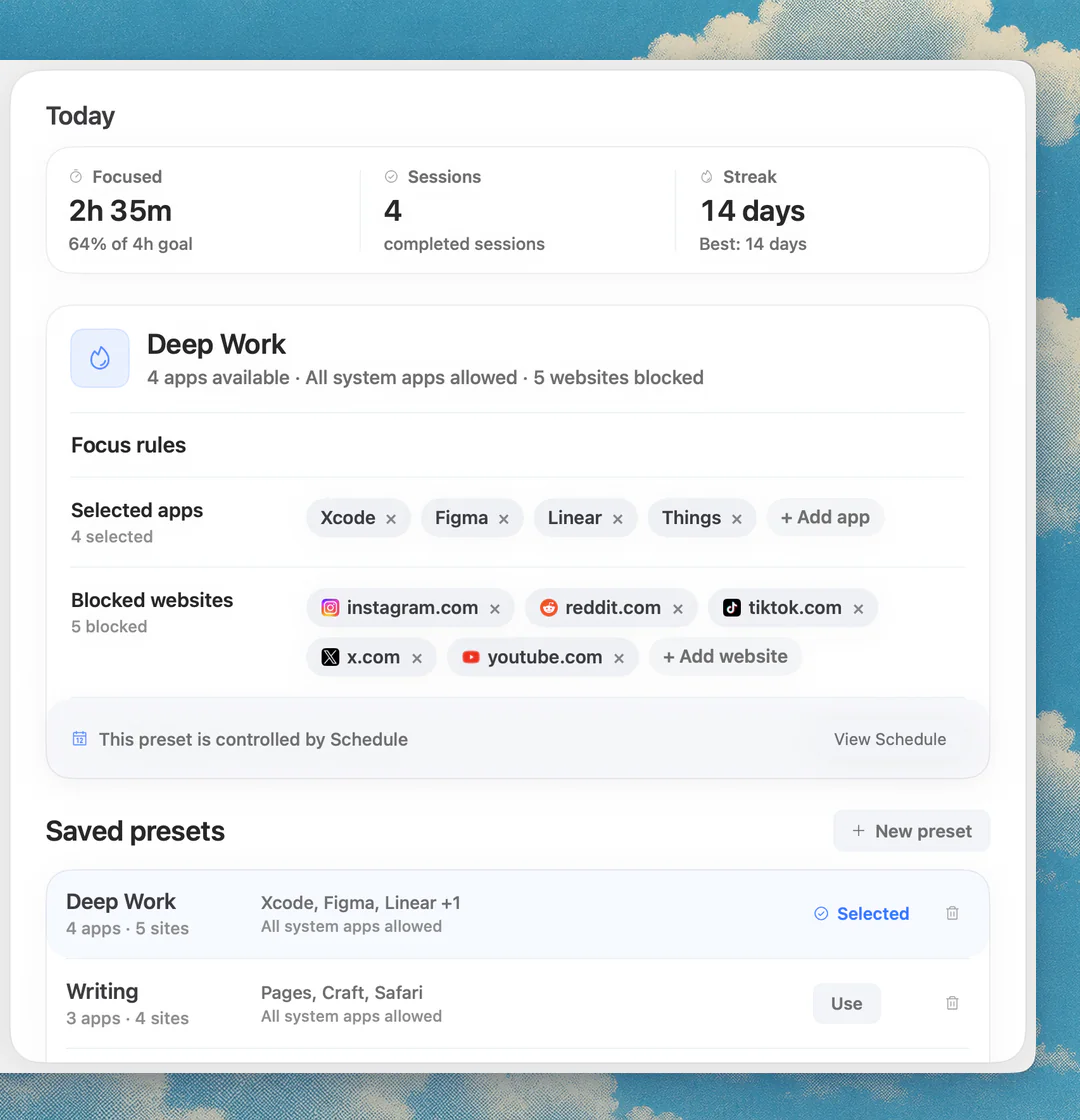
Sources
Keep reading
 FeatureMenu bar focus timer
 PomodoroThe 52/17 rule: what it is and how to try it on a Mac
 PomodoroPomodoro timer with website blocking: a Mac setup that actually helps
 Time blockingBest time blocking apps for Mac in 2026
 Website blockingWebsite blocker for Mac: the best website and app blockers in 2026
 Focus appsBest focus app for Mac in 2026