How to stop procrastinating on a Mac: 7 practical steps
How to stop procrastinating on a Mac: remove the triggers, make starting easy, silence notifications and set a schedule. Concrete steps for macOS and Nudge.

Quick answer
To stop procrastinating on a Mac, change the computer, not your willpower: block the sites and apps you drift to while you work, write down the first small step, start a short timer, silence notifications with a Focus, and repeat it on a schedule. Nudge blocks the apps and websites you pick during a session and can run on a schedule, so the distraction is already out of reach when you sit down.
How do these apps compare?
Stop putting work off on a Mac using concrete changes to the computer: block the sites and apps you drift to, make the first step small, silence notifications and run work on a schedule.
| App | Best for | Price | Website |
|---|---|---|---|
 NudgeTop pick NudgeTop pick | Blocking the apps and sites you drift to | $9.99 once | Get Nudge |
 Apple Screen Time Apple Screen Time | Free daily limits and schedules | Free, built into macOS | Visit |
 Cold Turkey Cold Turkey | Strict blocking that is hard to undo | Free, Pro $45 once | Visit |
 Freedom Freedom | The same block on Mac and phone | $8.99/mo or $99.50 lifetime (Oct deal) | Visit |
Which tool should you pick?
Take away the easy exits
Nudge
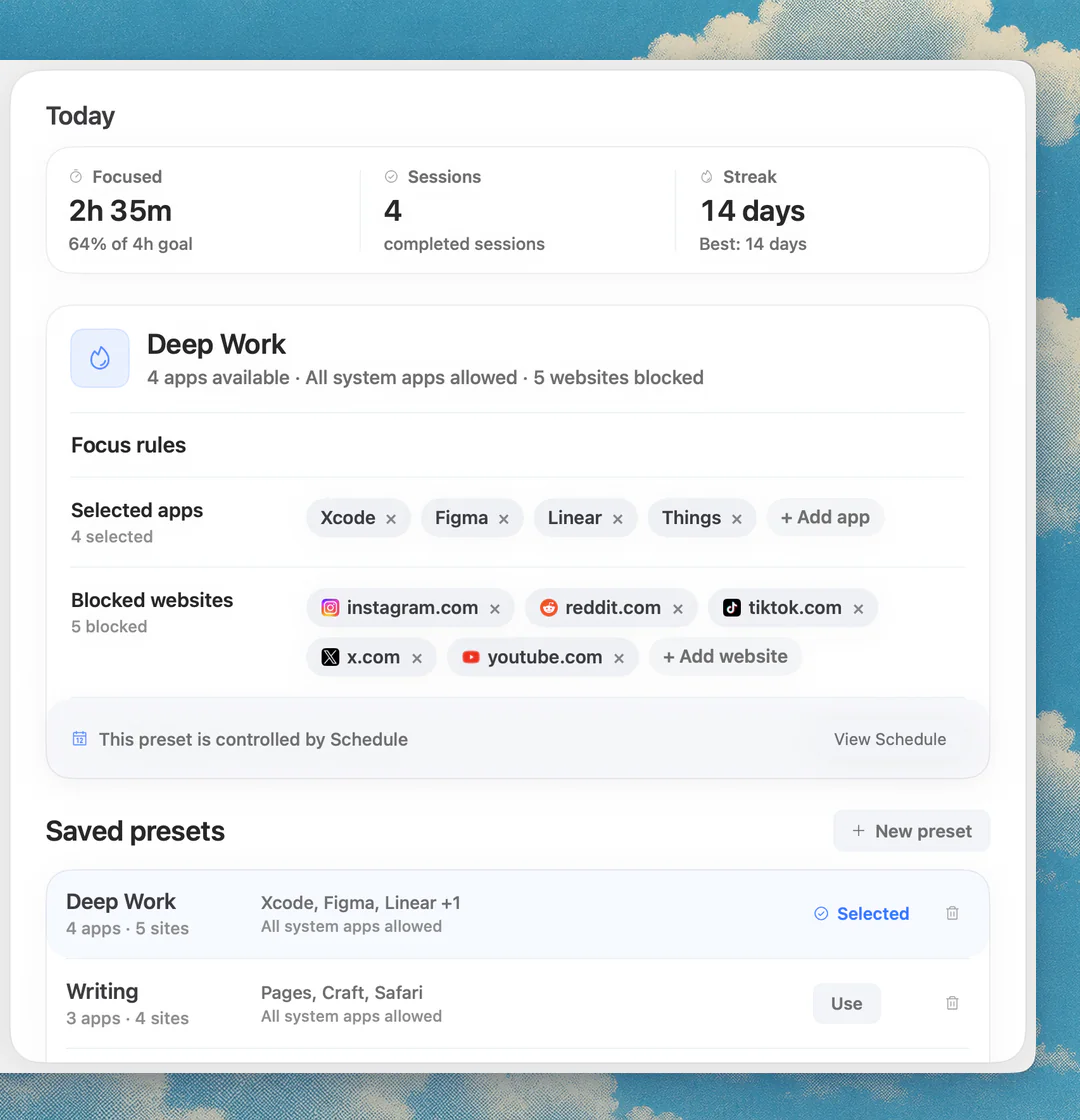
Blocks the apps and websites you pick while a session runs, started from the menu bar or on a schedule.
Start in under a minute
Free Pomodoro timer
Presets for Pomodoro 25/5, Deep work 50/10 and Long focus 90/20. No sign-up.
Silence notifications
macOS Focus
Built in and free. Silences notifications, but does not block apps or websites.
Built-in limits
Apple Screen Time
App Limits and Downtime on macOS 26 and earlier, Schedule and Time Allowances on macOS 27.
The apps in detail
- $9.99 once
1. App and website blocking
Nudge
Best for: Blocking the apps and sites you drift to
- Choose it if
- You want chosen apps and websites blocked during work sessions or on a schedule, for $9.99 once. 7-day free trial with no email, password or card.
- Skip it if
- Your main distraction is your phone: Nudge is a Mac app, so look at Freedom, Opal or Session.
- Free, built into macOS
2. Usage limits
Apple Screen Time
Best for: Free daily limits and schedules
- Choose it if
- You want a built-in cap on an app or category, protected by a passcode.
- Skip it if
- You want the block tied to work sessions rather than a daily budget.
- Free, Pro $45 once
3. App and website blocking
Cold Turkey
Best for: Strict blocking that is hard to undo
- Choose it if
- You need a block that is difficult to switch off once it is on.
- Skip it if
- You want a light, menu bar workflow.
- $8.99/mo or $99.50 lifetime (Oct deal)
4. App and website blocking
Freedom
Best for: The same block on Mac and phone
- Choose it if
- The same sites pull you away on your phone too.
- Skip it if
- You only need a Mac-local tool.
Why do you procrastinate on a Mac?
A Mac makes the alternative to your work a click away. The browser that holds your document also holds YouTube, Reddit and your inbox, and notifications arrive in the corner of the screen you are working on. When doing something else costs one click and doing the work costs effort, the click often wins.
That is a statement about the setup, not about you. The steps below change the setup: they put distance between you and the easy exits, make the first step small and give the day a shape. They are practical habits, and no app replaces professional care.
What are the steps to stop procrastinating on a Mac?
Here is the short version. Each step is explained below.
List the sites and apps you open instead of working.
Block them for the length of a work session.
Write the first step of the task on a sticky note or in a notes app.
Start a timer for 25 minutes and begin with that first step.
Turn on a Focus so notifications stay quiet.
Put work blocks in your calendar, and run the blocker on a schedule.
Review at the end of the day: where did you still drift?
How do you remove the triggers?
Look back at the last week and write down where you went instead of working. It is usually a handful of places: a video site, a social feed, a news site, a chat app, a game. Those are your triggers. Block those, not everything.
Nudge blocks the apps and websites you pick while a focus session runs, and they are reachable again when it ends. Websites are blocked in Safari and Chrome. Create a preset, such as Deep Work, with your list, and start it from the menu bar before you open the task. Nudge costs $9.99 once for Lifetime Access, with a 7-day free trial that needs no email, password or card.
For step-by-step guides on the common ones, see how to block websites on a Mac, how to block apps on a Mac and the best website blocker apps for Mac. For games in particular, see how to block games on a Mac.
Can you block distractions with Screen Time instead?
Partly. Screen Time is free and built in, and a passcode makes its limits harder to undo. It limits time rather than tying a block to work, so it suits a daily cap better than a work session.
The labels depend on your macOS version. On macOS 26 and earlier, open System Settings, click Screen Time, then App Limits to cap an app, category or website, and Downtime to block apps during set hours. On macOS 27 the settings are Schedule and Time Allowances. Schedule sets time windows with the app categories you allow in each, and Time Allowances set daily limits by app category.
If Screen Time does not fit, an app blocker lets you pick specific apps and sites for a session.
How do you make starting easier?
Starting is often the hard part, so make it small. Before you stop work for the day, write the first physical step of tomorrow's task, for example "open the report and write the heading" instead of "work on the report". When you sit down, you do not have to decide what to do, only to do the step.
Then use a short timer. The free Pomodoro timer at nudgefocus.app runs in any browser with no sign-up. Its presets are Pomodoro 25/5, Deep work 50/10 and Long focus 90/20, plus Custom. Pick Pomodoro and tell yourself you only have to work until the bell. When the bell goes, you can stop or go on. If you want a longer rhythm later, the 52/17 rule and the Flowtime technique are two alternatives, and the best Pomodoro apps for Mac compares timers.
How do you stop notifications interrupting you?
Notifications give you a reason to look away. Focus mode silences them. In Control Center, click the Focus section and choose a Focus such as Do Not Disturb or Work. To build your own, open System Settings, click Focus, then Add Focus, and choose which people and apps may notify you.
Focus does not stop you opening an app or a website, so it covers only half of the problem. Use it with a blocker. The guide to Focus mode on a Mac walks through the setup, including schedules.
How do you set a schedule so you do not have to decide?
Deciding each morning when to work is another place to put things off. Pick fixed work blocks, such as 9:00 to 11:00 on weekdays, and put them in your calendar. Then let the tools follow the calendar.
In Nudge, add a schedule to a preset so it runs on the days and hours you choose, without you starting it. In Focus settings, add a time-based schedule so notifications go quiet in the same window. In the morning, you open the Mac and the blocks are already on.
What should you do when you still drift?
You will. Notice where you went, and add it to the list. If the block feels too strict and you keep switching it off, narrow it to the three worst sites and keep it on. If you disable it often, the problem is the list, not you.
Keep the breaks real. Step away from the screen for a few minutes between blocks instead of opening the blocked sites. At the end of the day, note where you still drifted and adjust the list for tomorrow.
FAQ
How do I stop procrastinating on my Mac?
Block the sites and apps you drift to during work sessions, write the first small step of the task, start a short timer, silence notifications with a Focus, and run work blocks on a schedule. Nudge blocks the apps and websites you pick and can run on a schedule.
What is the best procrastination blocker for Mac?
Nudge is built for blocking during work sessions from the menu bar, at $9.99 once. Cold Turkey is stricter and harder to undo. Freedom blocks across Mac and phone. Apple Screen Time is free and built in but works on daily limits and schedules.
How do I stop procrastinating on my computer?
Change the computer. Put the distractions out of reach for the length of a session, make the first step small, and use a short timer. Silencing notifications with Focus mode helps too.
Does Focus mode stop procrastination on Mac?
It silences notifications, which removes one reason to look away. It does not block apps or websites, so pair it with a blocker.
Can Screen Time block distracting sites on Mac?
Yes, in part. On macOS 26 and earlier, App Limits and Downtime can block apps and websites on a daily limit or a schedule. On macOS 27, Schedule and Time Allowances work by app category. For a block tied to work sessions, use an app blocker.
How do I stop procrastinating on YouTube on my Mac?
Block youtube.com for the length of your work sessions. Add it to a Nudge preset and start the preset from the menu bar or on a schedule, and it is blocked in Safari and Chrome until the session ends. Screen Time and the hosts file can block it too, as the guide to blocking YouTube on a Mac explains.
Nudge for Mac
Turn the guide into a focus session
Pick the apps and websites that pull you away and start the session from the menu bar. They stay blocked until it ends. $9.99 once after 7 days free, no card to start.
Download for macOS